Can I Track My SWM ATV via GPS on My Phone?
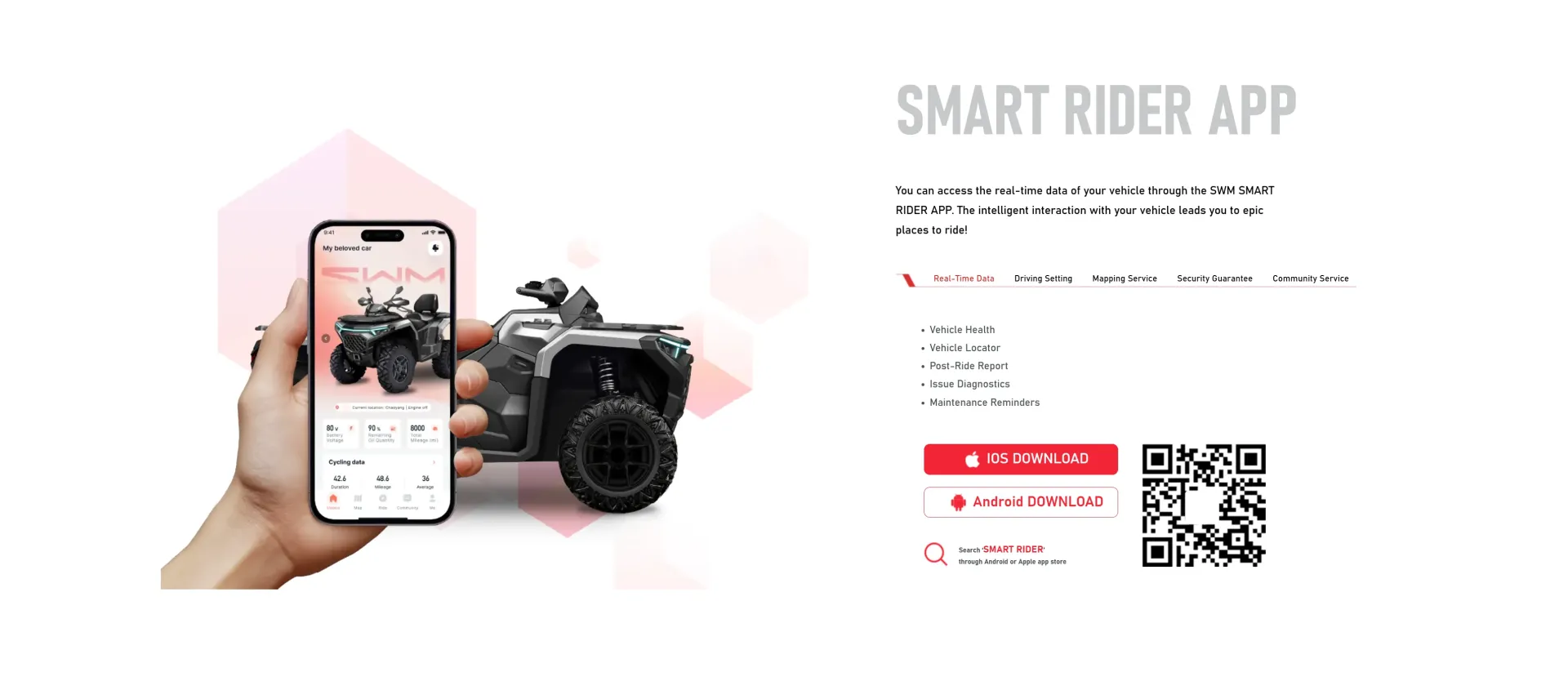
Yes, SWM has equipped its latest Trailhunter and Nomader series with the SWM-SMART RIDER intelligent interactive system as standard. This is not just a simple locator, but a deep "vehicle brain." The ecosystem allows users to perform real-time GPS tracking and security monitoring directly via their smartphone. You can track your ATV through the SWM-SMART RIDER app on your phone. The app provides several integrated smart features, including:
Vehicle Locator: The app includes a "Vehicle Locator" function as part of its real-time data and security suite.
Security & Geo-Fencing: The app offers a "Security Guarantee," which includes Geo-Fencing capabilities, allowing you to set virtual boundaries and receive alerts.
Real-time Monitoring: Beyond location information, the app provides real-time data such as power, torque, battery status, and oil quantity, as well as post-ride reports and maintenance reminders.
Mapping Service: Includes integrated waypoints and heat maps to help you find your way back or discover popular trails.
How to Connect the SWM-SMART RIDER App to My ATV
Step 1: Download and Registration
Download: Search for "SWM-SMART RIDER" in the Apple App Store or Google Play.
Registration: Create an account using your mobile number or email and complete real-identity verification (anti-theft warning functions in some regions require real-name activation).
Step 2: Vehicle Binding and Pairing (Critical Step)
Power On: Turn the ATV key to the "ON" position (no need to start the engine, but power must be on).
Scan to Connect: Click "Add Vehicle" in the app and scan the unique QR code found in the settings menu of the vehicle’s dashboard (TFT screen).
Activate T-BOX: The system will automatically connect to the vehicle's T-BOX (Telematics Box). Once the connection is successful, the dashboard will display an icon indicating the phone is synchronized.
Step 3: Enable GPS Tracking and Security Functions
Real-time Positioning: Click "Mapping Service" on the app's home page to view the current satellite coordinates of the vehicle.
Set Geo-Fencing: Define a radius in the security settings (e.g., 500 meters around your home). If the vehicle moves out of this area without authorization, your phone will immediately receive a push alert.
Precautions (Details to Ensure Successful Use)
Permission Management: In your phone settings, you must grant the SWM App "Always allow location access" and "Auto-start permissions." Otherwise, you will not receive Geo-fencing alarm pushes if the app is killed by the system in the background.
Firmware Updates: Regularly check the dashboard for OTA updates. SWM frequently fixes bugs related to GPS positioning offset or disconnection.
Alert Priority: It is recommended to set the notification sound for "Abnormal Movement Alarm" to a unique tone to avoid it being buried among regular WeChat or system notifications.
Sleep Mode: When the ATV is not used for a long time, the vehicle will enter "Deep Sleep" to protect the battery. During this time, the GPS may only update its location once per hour instead of in real-time.
Signal Blind Spots: ATVs are often taken into deep mountains and forests. If the vehicle is parked in a valley with no mobile signal (2G/4G/5G), the phone app will only be able to display the last location where a signal was available.
Battery Voltage: The GPS module relies on the ATV’s battery for power. If the battery is depleted, the anti-theft tracking function will automatically shut down. It is recommended to install a solar maintenance charging panel or regularly start the engine to charge the battery.
-
May 27 2026
learn more
 Can I Track My SWM ATV via GPS on My Phone?
Can I Track My SWM ATV via GPS on My Phone?
Can I Track My SWM ATV via GPS on My Phone?
-
May 25 2026
learn more
 ATV vs UTV: Which Off-Road Vehicle Is Right for You
ATV vs UTV: Which Off-Road Vehicle Is Right for You
ATV vs UTV: Which Off-Road Vehicle Is Right for You
-
May 27 2026
learn more
 Can You Drive a UTV on Public Roads
Can You Drive a UTV on Public Roads
Can You Drive a UTV on Public Roads